
Legacy RS-232 Serial, MT-SICS, ASTM & Flat-File Instruments Integration Guide (PI UFL Replacement)
Replacing the OSIsoft / AVEVA PI Interface for Universal File and Stream Loading (PI UFL) to Connect Standalone Analytical Balances, Osmometers, Filter Integrity Testers, and Legacy Benchtop Analyzers to GxPHistorian GxP Industrial Historian
1. Overview: Why Biopharma Facilities Rely on Serial & File-Stream Ingestion
Across media preparation suites, buffer kitchens, In-Process Control (IPC) laboratories, and downstream filtration rooms, thousands of critical GMP instruments do not have a PLC, OPC UA server, or Modbus register map. Instead, they communicate exclusively via:
- Unidirectional or Command/Response RS-232 / RS-422 Serial Ports (
DB9/RJ45): Streaming ASCII measurement tickets (MT-SICS,SBI,ASTM E1381/E1394, or custom print strings) through a Serial-to-Ethernet Terminal Server (e.g., Moxa NPort 5110/5610 or Digi PortServer TS). - Flat-File Network Drop Folders (
.csv,.txt,.xml,.cdf): Exporting batch or sample result files to a local directory or SMB/CIFS share upon assay completion.
In a traditional OSIsoft / AVEVA PI System, these instruments are ingested using the PI Interface for Universal File and Stream Loading (PI UFL) configured via complex .ini regex files.
GxPHistorian GxP Industrial Historian replaces PI UFL with deterministic Python edge workers that parse serial TCP streams and watched directories, enforce ALCOA+ data integrity (preserving the instrument’s native measurement timestamp, operator/sample ID, and file SHA-256 hash), spool locally during network outages, and post normalized JSON batches to http://edge-collector:8080/ingest.
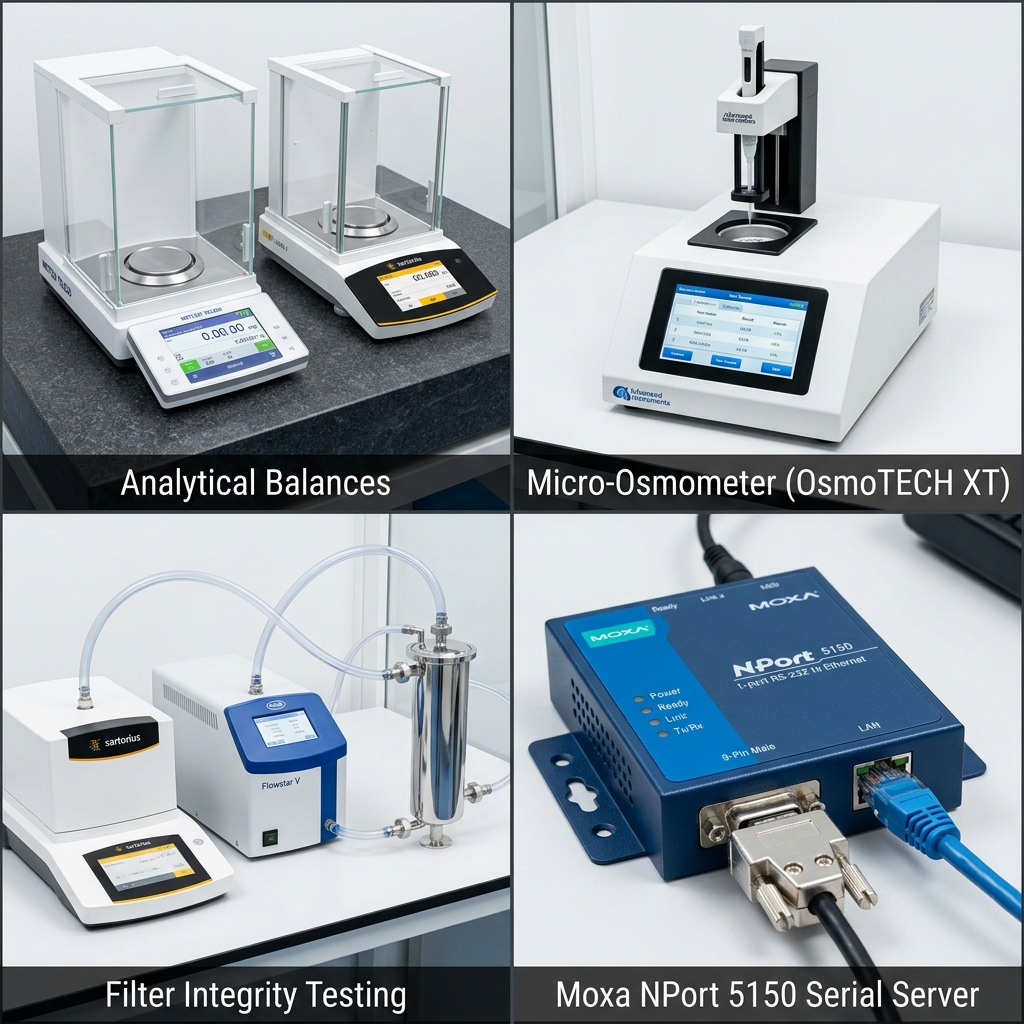
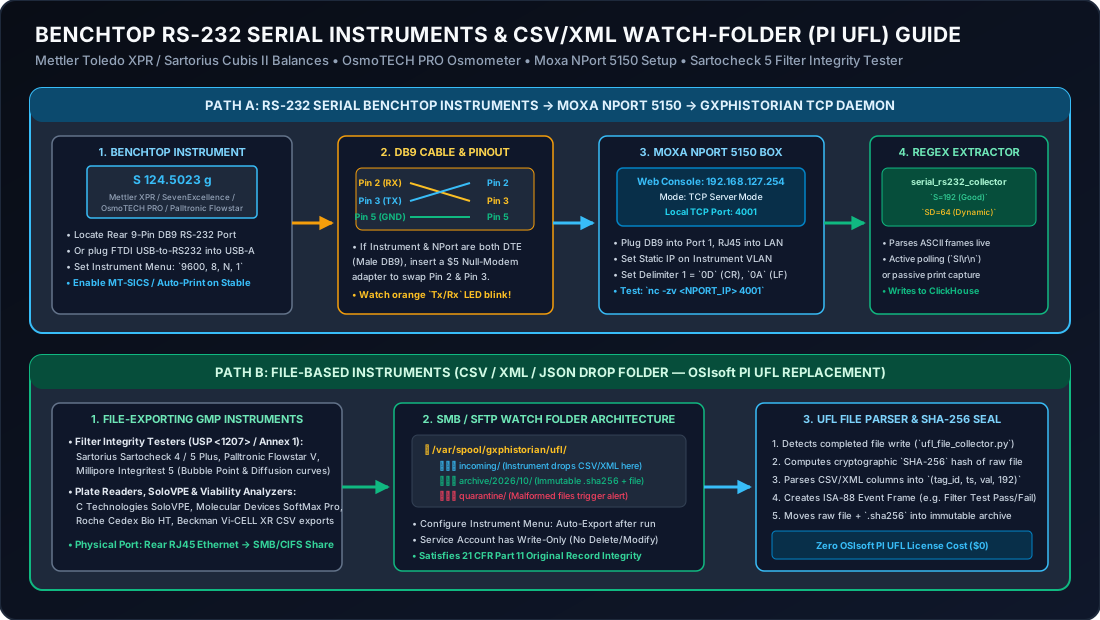
1.5 Non-Technical Step-by-Step Setup Guide (Balances, Osmometers & Filter Integrity Testers)
Even if you have never configured a serial port before, you can connect any benchtop Mettler Toledo / Sartorius Cubis® II Balance, Advanced Instruments OsmoTECH® Osmometer, or Sartocheck® 5 / Palltronic® Flowstar Filter Integrity Tester in 4 simple steps:
Path A: Connecting Any 9-Pin RS-232 Benchtop Balance or Osmometer via a Moxa NPort 5150
- What to Buy:
- 1x Moxa NPort 5150 1-Port RS-232/422/485 Serial Device Server (
~$130). - 1x DB9 Serial Cable + DB9 Mini Null-Modem Adapter (
~$10, swaps Pin 2RXand Pin 3TX). - 1x Standard Cat6 Ethernet Patch Cable (
~$10).
- 1x Moxa NPort 5150 1-Port RS-232/422/485 Serial Device Server (
- Plug In the Cables:
- Plug the 9-pin DB9 cable into the
RS-232 / COMport on the back of your balance or osmometer and connect the other end to Port 1 on the Moxa NPort 5150. - Plug the Cat6 Ethernet cable into the Moxa NPort’s RJ45 jack and into your lab wall Ethernet port.
- Plug the 9-pin DB9 cable into the
- Set the Balance / Osmometer Screen Settings (Must Match the Moxa!):
- On a Mettler Toledo XPR / XSR / ICS Balance: Tap Settings Connections RS232 Protocol =
MT-SICS, Baud =9600, Data Bits =8, Parity =None, Stop Bits =1(9600 8N1), Handshake =Off/Xon-Xoff. - On a Sartorius Cubis® II Balance: Tap Settings Connections COM / RS232 Protocol =
SBIorSICS(9600 8N1).
- On a Mettler Toledo XPR / XSR / ICS Balance: Tap Settings Connections RS232 Protocol =
- Configure the Moxa NPort 5150 Web Console (2 Minutes in Any Browser):
- Open
http://192.168.127.254(default Moxa IP) in your browser and log in (admin/moxa). - Under Network Settings, assign your lab static IP (e.g.,
10.20.55.10). - Under Serial Settings Port 1, set Baud Rate =
9600, Data Bits =8, Stop Bits =1, Parity =None, Interface =RS-232. - Under Operating Settings Port 1, select Operation Mode =
TCP Server Mode, Local TCP Port =4001, Delimiter 1 =0D(\r), Delimiter 2 =0A(\n), and click Save/Restart. - How to Verify It Works: Press the
Printbutton on your balance and watch the orangeTx/RxLED on top of the Moxa NPort blink! If it doesn’t blink, snap the Null-Modem Adapter onto the DB9 cable and pressPrintagain.
- Open
Path B: Connecting a Filter Integrity Tester (Sartocheck® 5, Palltronic® Flowstar V, Integritest® 5) via Shared Folder
- Plug a Cat6 Ethernet cable into the rear RJ45 network port of the Filter Integrity Tester cart.
- On the tester’s touchscreen, log in as Administrator System Settings Network Export / File Transfer (SMB/CIFS).
- Enter the
GxPHistorianwatch-folder network share path:\\10.20.10.50\gxphistorian_ufl\incoming\filter_integrityand check Automatically Export XML/CSV Report After Test Completion. - Every time an operator finishes a Pre-Use Post-Sterilization Integrity Test (PUPSIT) or Post-Use Bubble Point / Diffusion test, the tester drops the signed report into
incoming/, whereGxPHistorianhashes the raw file with SHA-256, extracts the Bubble Point (mbar) and Diffusion Rate (mL/min), creates an ISA-88 Event Frame, and moves the original file into the immutable WORM archive!
2. Architecture: Replacing OSIsoft PI UFL with GxPHistorian Edge Workers
flowchart LR
  subgraph Lab["Standalone Benchtop & At-Line GMP Instruments"]
    BAL["Mettler Toledo / Sartorius Balance\n(RS-232 MT-SICS / SBI ASCII)"]
    OSMO["Advanced Instruments OsmoTECH® /\nFiske® 210 Osmometer (RS-232)"]
    MOXA["Moxa NPort 5610 Terminal Server\n(TCP Raw Socket :4001–:4008)"]
    FIT["Sartorius Sartocheck® 4 Plus /\nPalltronic® Flowstar IV (CSV/XML Export)"]
    CEDEX["Legacy Vi-CELL™ XR / Cedex® Bio HT\n(Shared Drop Folder .txt / .csv)"]
    BAL -->|"RS-232 (9600 8N1)"| MOXA
    OSMO -->|"RS-232 (9600 8N1)"| MOXA
  end

  subgraph Edge["Pillar 1: Edge Collector (edge-collector)"]
    SER_W["Serial Stream Worker\n(MT-SICS / Regex Parser + Spool)"]
    UFL_W["Universal Watchfolder Worker\n(SHA-256 File Hash + Timestamp Parser)"]
    ING["HTTP Ingest (:8080/ingest)"]
    WAL["Telegraf Disk WAL Buffer\n(/var/lib/telegraf/buffer)"]
    SER_W --> ING
    UFL_W --> ING
    ING --> WAL
  end

  subgraph Core["GxPHistorian GxP Historian"]
    CH["ClickHouse 24.8 Archive\n(pi_historian.sensor_data)"]
    PG["PostgreSQL 16 Control Plane\n(is_step_tag=true, exc_dev=0.0)"]
  end

  MOXA -->|"TCP Socket Stream"| SER_W
  FIT -->|"SMB / Local Drop Folder"| UFL_W
  CEDEX -->|"SMB / Local Drop Folder"| UFL_W
  WAL -->|"JSONEachRow"| CH
  PG <--> CH
3. Target Legacy Serial & Flat-File Biopharma Instruments
| Instrument Category | Common Models in GMP Biopharma | Output Interface & Format | Key Parameters Archived in GxPHistorian | Recommended Tag Settings |
|---|---|---|---|---|
| Analytical & Floor Balances | Mettler Toledo Excellence (XPR/XSR), ICS429/689; Sartorius Cubis® II / Combics | RS-232 / TCP MT-SICS (S S 125.42 g) or multi-line GLP print ticket | Net Dispensed Weight (g or kg), Tare Weight, Lot/Material ID (str_val) | is_step_tag = true (LOCF), exc_dev = 0.0 |
| Freezing-Point Osmometers | Advanced Instruments OsmoTECH®, OsmoPRO®,Osmo1, Fiske® 210; Gonotec Osmomat | RS-232 ASCII ticket, ASTM E1394, or CSV export | Osmolality (mOsm/kg H2O), Sample ID (str_val) | is_step_tag = true (LOCF), exc_dev = 0.0 |
| Filter Integrity Testers (FIT) | Sartorius Sartocheck® 4 Plus / 5; Pall Palltronic® Flowstar IV / V; Millipore Integritest® 5 | Network CSV / XML / PDF ticket drop or RS-232 | Bubble Point (mbar / psi), Diffusion Rate (mL/min), Water Intrusion (mL/min), Pass/Fail status | is_step_tag = true (LOCF), exc_dev = 0.0 |
| Benchtop pH / Conductivity Meters | Mettler Toledo SevenExcellence™; Thermo Orion™ Versa Star Pro | RS-232 ASCII CSV string or LabX® XML drop | Offline pH Check, Offline Conductivity (mS/cm), Calibration Slope (%) | is_step_tag = true (LOCF), exc_dev = 0.0 |
| Blood Gas & Legacy Cell Counters | Radiometer ABL90 FLEX; Beckman Coulter Vi-CELL™ XR | ASTM E1394 / HL7 TCP stream or .txt archive file | Offline pH, , , Viability %, VCD (10^6 cells/mL) | is_step_tag = true (LOCF), exc_dev = 0.0 |
4. Production Example 1: RS-232 / Moxa NPort TCP Serial Worker (MT-SICS Balances & Serial Osmometers)
In media and buffer preparation rooms, RS-232 ports on Mettler Toledo balances and Advanced Instruments osmometers are connected to a Moxa NPort configured in TCP Server Mode (e.g., IP 10.20.70.10, Port 4001 = Balance 01, Port 4002 = Osmometer 01).
How Mettler Toledo MT-SICS Frame Parsing & OPC Quality Mapping Works
Standard MT-SICS responses follow a strict status grammar:
S S 1250.45 gStable (S S) weight reading: mapped toval = 1250.45,quality = 192(Good),status_code = 0.S D 1248.10 gDynamic / Unstable (S D) weight reading (operator still pouring powder): mapped toval = 1248.10,quality = 64(Uncertain),status_code = 3(excluded from GMP rollups!).S +orS -Overload / Underload Fault: mapped toval = 0.0,quality = 0(Bad),status_code = 1.
Reference Implementation (serial_ufl_stream_worker.py)
#!/usr/bin/env python3"""GxPHistorian Replacement for OSIsoft PI UFL (Serial / Moxa NPort TCP Stream Mode).Parses Mettler Toledo MT-SICS balance frames and Advanced Instruments OsmometerRS-232 tickets, maps stability flags to OPC quality (192/64/0), and posts to :8080/ingest."""from __future__ import annotations
import reimport socketimport timefrom typing import Optionalimport httpx
# Regex 1: Mettler Toledo MT-SICS response: "S S      125.420 g" or "S D       45.100 g"MT_SICS_RE = re.compile(r"^S\s+(?P<status>[SD\+\-])\s*(?P<val>[\-\d\.]+)?\s*(?P<unit>[a-zA-Z]+)?$")
# Regex 2: Advanced Instruments Fiske 210 / OsmoPRO RS-232 ticket: "SAMPLE=BR201_D3  OSMO=294 mOsm/kg"OSMO_TICKET_RE = re.compile(r"SAMPLE=(?P<sample_id>\S+)\s+OSMO=(?P<val>\d+(?:\.\d+)?)\s*mOsm", re.IGNORECASE)

def parse_mt_sics_line(line: str, tag_id: int) -> Optional[dict]:    match = MT_SICS_RE.match(line.strip())    if not match:        return None    status = match.group("status")    ts_ms = int(time.time() * 1000)
    if status in ("+", "-"):        return {            "tag_id": tag_id,            "ts": ts_ms,            "val": 0.0,            "str_val": "OVERLOAD_OR_UNDERLOAD_FAULT",            "quality": 0,       # Bad quality            "status_code": 1,        }
    val = float(match.group("val") or 0.0)    unit = match.group("unit") or "g"    if unit.lower() == "kg":        val *= 1000.0  # Normalize to grams
    is_stable = status == "S"    return {        "tag_id": tag_id,        "ts": ts_ms,        "val": round(val, 4),        "str_val": "STABLE_WEIGHT" if is_stable else "DYNAMIC_UNSTABLE",        "quality": 192 if is_stable else 64,  # 192=Good (Stable), 64=Uncertain (Dynamic)        "status_code": 0 if is_stable else 3,    }

def parse_osmometer_line(line: str, tag_id: int) -> Optional[dict]:    match = OSMO_TICKET_RE.search(line.strip())    if not match:        return None    return {        "tag_id": tag_id,        "ts": int(time.time() * 1000),        "val": float(match.group("val")),        "str_val": match.group("sample_id"),        "quality": 192,        "status_code": 0,    }

def stream_moxa_serial_port(host: str, port: int, tag_id: int, ingest_url: str = "http://localhost:8080/ingest") -> None:    """Connects to a Moxa NPort TCP raw serial socket and forwards parsed points to edge-collector."""    with socket.create_connection((host, port), timeout=10.0) as sock:        sock_file = sock.makefile("r", encoding="ascii", errors="replace")        for raw_line in sock_file:            payload = parse_mt_sics_line(raw_line, tag_id) or parse_osmometer_line(raw_line, tag_id)            if payload:                httpx.post(ingest_url, json=[payload], timeout=5.0).raise_for_status()
5. Production Example 2: Universal Flat-File Watchfolder Worker (Filter Integrity Testers & Legacy Cell Analyzers)
When a Sartorius Sartocheck® 4 Plus or Pall Palltronic® Flowstar IV completes a pre-use or post-use sterilizing-grade filter integrity test (Bubble Point or Forward Flow / Diffusion), it writes a structured CSV or XML result file into a watched directory.
Reference Implementation (flatfile_ufl_watcher.py)
#!/usr/bin/env python3"""GxPHistorian Replacement for OSIsoft PI UFL (Flat-File Watchfolder Mode).Monitors a directory for Filter Integrity Tester (Sartocheck / Palltronic) andbenchtop analyzer CSV files, computes SHA-256 file hashes for ALCOA+ auditability,extracts explicit test completion timestamps, and posts to :8080/ingest."""from __future__ import annotations
import csvimport datetime as dtimport hashlibimport pathlibimport shutilimport httpx
# Map (Equipment_ID, Parameter_Name) -> GxPHistorian tag_idUFL_TAG_CATALOG = {    ("FIT_01", "BUBBLE_POINT_MBAR"): 851,    ("FIT_01", "DIFFUSION_ML_MIN"):  852,    ("FIT_01", "TEST_RESULT_CODE"):  853,  # 1.0 = PASS, 0.0 = FAIL (Step Tag)}
def process_ufl_csv_file(    csv_file: pathlib.Path,    archive_dir: pathlib.Path,    ingest_url: str = "http://localhost:8080/ingest",) -> int:    # 1. Compute SHA-256 digest of the raw instrument file for ALCOA+ traceability    raw_bytes = csv_file.read_bytes()    file_sha256 = hashlib.sha256(raw_bytes).hexdigest()[:16]
    batch = []    with csv_file.open("r", encoding="utf-8-sig") as fh:        reader = csv.DictReader(fh)        for row in reader:            equip_id = row["EquipmentID"].strip().upper()            param = row["Parameter"].strip().upper()            tag_id = UFL_TAG_CATALOG.get((equip_id, param))            if tag_id is None:                continue
            # Parse explicit instrument timestamp (ISO-8601 UTC)            ts_dt = dt.datetime.fromisoformat(row["TimestampUTC"].replace("Z", "+00:00"))            ts_ms = int(ts_dt.timestamp() * 1000)
            batch.append({                "tag_id": tag_id,                "ts": ts_ms,                "val": float(row["Value"]),                "str_val": f"{row.get('BatchID', 'NA')}|sha256:{file_sha256}",                "quality": 192 if row.get("InstrumentStatus", "VALID") == "VALID" else 64,                "status_code": 0,            })
    if batch:        httpx.post(ingest_url, json=batch, timeout=5.0).raise_for_status()
    # Move processed file to immutable archive folder    archive_dir.mkdir(parents=True, exist_ok=True)    shutil.move(str(csv_file), str(archive_dir / f"{csv_file.stem}_{file_sha256}{csv_file.suffix}"))    return len(batch)
6. Provisioning Legacy Serial & UFL Tags via the 21 CFR Part 11 API
Because serial balance check-weights, osmolality readings, and filter integrity test results are discrete, event-driven GMP records:
- Set
"is_step_tag": true(LOCFinterpolation). - Set
"exc_dev": 0.0so every single weighing or filter test is recorded in ClickHouse even if two consecutive vials or filters yield identical numerical values.
# Provision a Sartorius Sartocheck 4 Plus Bubble Point Integrity Test Tagcurl -s -X POST http://localhost:8020/api/v1/tags \ -H "Content-Type: application/json" \ -H "X-Actor-Id: operator_01" \ -H "X-Change-Reason: Provision Sartocheck 4 Plus Bubble Point tag via GxPHistorian UFL Watchfolder" \ -d '{ "tag_id": 851, "tag_name": "DSP_FIT01_BUBBLE_PT_PV", "asset_id": 1, "attribute_name": "Sterilizing_Filter_Bubble_Point", "eng_units": "mbar", "is_step_tag": true, "exc_dev": 0.0, "low_limit": 3200.0, "high_limit": 5000.0, "source_protocol": "PI_UFL_CSV", "source_config": { "watch_dir": "/var/spool/gxphistorian/fit_drop", "equipment_id": "FIT_01", "parameter": "BUBBLE_POINT_MBAR" } }' | jq .If a post-use filter integrity test reports a Bubble Point below low_limit: 3200.0 mbar (e.g., 2850.0 mbar), GxPHistorian’s Event Frame engine (POST /api/v1/event-frames/evaluate) automatically opens a CRITICAL excursion Event Frame on the batch, requiring formal QA investigation and a dual-challenge 21 CFR Part 11 electronic signature (POST /api/v1/event-frames/{event_id}/sign).