
OPC UA (`TCP :4840`) & Classic OPC DA (`COM/DCOM`) Connectors: How They Work & Setup Guide
Document ID: REF-CONNECTOR-OPC-GXPHISTORIAN-2026
Protocols Covered: OPC Unified Architecture (OPC UA, IEC 62541) over opc.tcp://:4840 and Classic OPC Data Access (OPC DA 2.05a / 3.0) over Microsoft Windows COM/DCOM
Typical Biopharma Equipment: Cytiva Xcellerex™ (Figurate™), Sartorius Biostat STR® & Ambr® 15/250, Thermo HyPerforma™ (TruBio™ DV), Eppendorf BioFlo® 320, Cytiva ÄKTA™ (UNICORN™ 7), Beckman Vi-CELL™ BLU, Nova BioProfile® FLEX2, Miltenyi CliniMACS Prodigy®, SKAN Isolators, and SP Hull / Telstar GMP Lyophilizers
1. Visual Architecture: How OPC UA & Classic OPC DA Work Under the Hood
OPC (Open Platform Communications) is the most widely used interoperability standard in pharmaceutical automation, but it exists in two completely different generations that share only a name:
- OPC UA (Unified Architecture — 2008 to Present): Modern, cross-platform (runs natively on Linux, embedded PLCs, and Windows), uses a single firewall port (
TCP 4840), organizes tags in a browsable object tree (NodeId), and encrypts traffic using X.509 digital certificates (Basic256Sha256). - Classic OPC DA (Data Access 2.05a / 3.0 — 1996 to 2010s): Legacy Microsoft Windows-only protocol built on COM / DCOM (Distributed Component Object Model). Network DCOM is notorious in biopharma IT because it requires opening
TCP 135plus 16,000+ dynamic high ports (49152–65535) across firewalls. GxPHistorian solves this permanently with a Zero-DCOM Localhost Bridge (opcda_windows_forwarder.py).
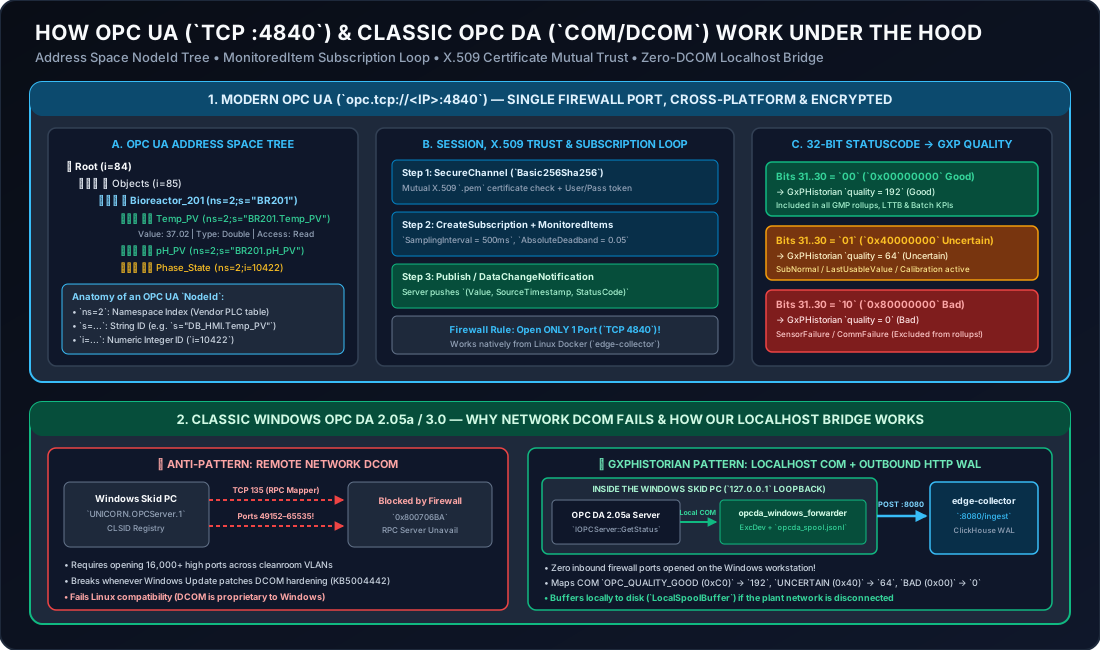
2. Deep Dive 1: How OPC UA (opc.tcp://:4840) Works Under the Hood
2.1 Physical Layer & Network Transport
- Physical Connector: Standard RJ45 Ethernet (Cat6/Cat6A) or M12 D-Coded / X-Coded washdown Ethernet on the PLC or instrument control panel.
- Transport Protocol: Binary TCP stream over Port
4840(opc.tcp://<IP_ADDRESS>:4840). (Note: Some Kepware / FactoryTalk gateways default to Port49320or4897).
2.2 The OPC UA Address Space & NodeId Anatomy
Unlike Modbus (which only knows numbered memory registers like 40001), an OPC UA server exposes a self-describing Object Graph (Address Space) starting from Root (i=84) Objects (i=85).
Every variable or folder in an OPC UA server is uniquely addressed by a NodeId composed of two parts:
- Namespace Index (
ns=<UInt16>): Identifies which software dictionary owns the node:ns=0: Standard OPC Foundation base types (ServerStatus,CurrentTime).ns=1: Vendor server diagnostics.ns=2(orns=3,ns=4): The actual PLC / Instrument process tags (e.g., Siemens S7-1500 Data Blocks, Emerson DeltaV modules, or Sartorius MFCS tags).
- Identifier Type & Value (
i=,s=,g=,b=):s=<String>(String Identifier — Most Common): Human-readable path such asns=2;s="DB_Bioreactor"."Temp_PV"orns=2;s=BR201/TT_201/PV.CV.i=<UInt32>(Numeric Identifier): Compact integer index such asns=2;i=10422(common on B&R, Beckhoff, and embedded Siemens OPC UA servers).g=<GUID>(UUID Identifier): 128-bit UUID such asns=2;g=09087e75-8e5e-499b-954f-f2a9603db28a.
2.3 How OPC UA Subscriptions & MonitoredItems Work (Report-by-Exception)
Instead of wastefully polling 5,000 bioreactor tags every second, OPC UA uses a stateful Subscription & Publish mechanism:
CreateSession&ActivateSession:GxPHistorian(edge-collector) establishes an encryptedSecureChanneland authenticates via X.509 client certificate and/or username/password.CreateSubscription: The client creates a subscription container with aPublishingInterval(e.g.,1000 ms).CreateMonitoredItems: Inside the subscription, the client registers its list ofNodeIds, specifying for each tag:SamplingInterval(e.g.,250 msor500 ms): How fast the PLC internally checks the sensor memory.DataChangeFilter(AbsoluteDeadband=exc_dev): The PLC only queues a notification if OR if the sensor’sStatusCode(Quality) changes!
Publish/DataChangeNotification: EveryPublishingInterval, the OPC UA server sends a compact binary packet containing only the tags that changed, together with their exact PLCSourceTimestampand 32-bitStatusCode.
2.4 How OPC UA 32-Bit StatusCode Maps to GxPHistorian Quality (192, 64, 0)
Every OPC UA value carries a 32-bit unsigned integer StatusCode. The top 2 bits (Bits 31 and 30) define the primary severity, which GxPHistorian maps directly to our GxP quality column:
OPC UA StatusCode Hex Prefix | Bits 31..30 | OPC UA Symbolic Name | GxPHistorian quality | GxPHistorian Behavior |
|---|---|---|---|---|
0x00000000 | 00 (Good) | Good, Good_LocalOverride | 192 (Good) | Archived in ClickHouse and included in all 1-min rollups, LTTB trends, Event Frame KPIs, and Excel DataLink queries. |
0x40000000 – 0x7FFFFFFF | 01 (Uncertain) | Uncertain_LastUsableValue, Uncertain_SensorNotAccurate, Uncertain_SubNormal | 64 (Uncertain) | Archived in raw ClickHouse table for QA/engineering audit, but excluded from GMP batch release calculations (WHERE quality >= 192). |
0x80000000 – 0xFFFFFFFF | 10 (Bad) | Bad_SensorFailure, Bad_DeviceFailure, Bad_OutOfService, Bad_CommunicationError | 0 (Bad) | Archived in raw ClickHouse table to prove when the sensor faulted, and strictly excluded from all rollups and averages. |
2.5 Step-by-Step: How to Generate & Trust X.509 OPC UA Certificates (Basic256Sha256)
In GMP production, OPC UA connections use SecurityPolicy = Basic256Sha256 and SecurityMode = SignAndEncrypt. Here is how mutual certificate trust works in 3 steps:
- Generate the
GxPHistorianClient Certificate (One-Time Command):Terminal window openssl req -x509 -newkey rsa:2048 -sha256 -days 3650 -nodes \-keyout edge-collector/certs/gxphistorian_client_key.pem \-out edge-collector/certs/gxphistorian_client_cert.pem \-subj "/CN=GxPHistorian-EdgeCollector/O=BioPharma-GMP/C=US" \-addext "subjectAltName = URI:urn:gxphistorian:edge:collector" - First Connection Attempt (Auto-Quarantine):
- When
edge-collectorfirst connects toopc.tcp://10.20.30.10:4840, the PLC/instrument placesgxphistorian_client_cert.peminto itsRejected / Untrusted Certificatesfolder.
- When
- One-Click Trust on the Instrument / PLC:
- Open the instrument’s OPC UA Security screen (e.g., Siemens TIA Portal / Sartorius MFCS / DeltaV Explorer / Vi-CELL BLU Admin UI), highlight
GxPHistorian-EdgeCollectorin the Rejected list, and click Trust / Move to Trusted Clients. The encrypted tunnel immediately goes live!
- Open the instrument’s OPC UA Security screen (e.g., Siemens TIA Portal / Sartorius MFCS / DeltaV Explorer / Vi-CELL BLU Admin UI), highlight
2.6 Production telegraf.conf OPC UA Configuration
[[inputs.opcua]]  name = "sensor_data"  endpoint = "opc.tcp://10.20.30.10:4840"  connect_timeout = "10s"  request_timeout = "5s"  security_policy = "Basic256Sha256"  security_mode = "SignAndEncrypt"  certificate = "/etc/telegraf/certs/gxphistorian_client_cert.pem"  private_key = "/etc/telegraf/certs/gxphistorian_client_key.pem"  auth_method = "UserName"  username = "${OPCUA_USER}"  password = "${OPCUA_PASS}"  timestamp = "source" # Always preserve the PLC's true SourceTimestamp!
  [[inputs.opcua.group]]    name = "bioreactor_201_telemetry"    namespace = "2"    identifier_type = "s"    default_tags = { asset = "BR201" }    nodes = [      { name = "val", identifier = "BR201.Temp_PV",   default_tags = { tag_id = "101" } },      { name = "val", identifier = "BR201.pH_PV",     default_tags = { tag_id = "102" } },      { name = "val", identifier = "BR201.DO_PV",     default_tags = { tag_id = "104" } }    ]
3. Deep Dive 2: How Classic OPC DA 2.05a (COM/DCOM) Works & How Our Localhost Bridge Eliminates DCOM
3.1 Why Legacy Biopharma Skids Still Have OPC DA
Thousands of validated workstations installed between 2000 and 2018—such as Cytiva UNICORN™ 5/6/7 (UNICORN.OPCServer.1), Rockwell RSLinx Classic (RSLinx OPC Server), Emerson DeltaV OPC Mirror (OPC.DeltaV.1), and Sartorius MFCS/win 3—run on Windows 7, Windows 10 LTSC, or Windows Server and expose Classic OPC DA 2.05a.
3.2 Why Network DCOM Fails in Modern Firewalled Plants
- When a remote OPC DA client tries to connect over the network, it first hits TCP Port
135(Microsoft RPC Endpoint Mapper) on the Windows PC. - The Windows RPC service replies with a randomly assigned high TCP port between
49152and65535. - Worse still, the OPC DA Server attempts a reverse DCOM callback (
IOPCDataCallback::OnDataChange) back to the client across another dynamic port, requiring matching Windows domain/local SIDs and registry permissions (dcomcnfg.exe). - Since Microsoft’s KB5004442 DCOM Hardening patch, cross-subnet DCOM connections between non-domain-joined cleanroom skid PCs and corporate historians routinely break.
3.3 How GxPHistorian Solves OPC DA (edge-collector/scripts/opcda_windows_forwarder.py)
Instead of fighting network DCOM across firewalls, you run opcda_windows_forwarder.py directly on the Windows workstation as a lightweight Windows Service:
- 100% Localhost COM (
127.0.0.1): Because the Python script and the vendor OPC DA Server (UNICORN.OPCServer.1) run on the same Windows machine, Windows uses Local Inter-Process COM (LPC/ALPC)—zero network DCOM ports are used! - Stage 1 Exception/Deadband Filtering in RAM:
WindowsOpcDaForwarderevaluatesexc_devandexc_maxper tag so steady-state noise is suppressed while chromatography peaks (UV1_280) are captured at full resolution. - Local Disk Spool (
LocalSpoolBuffer): If the plant Ethernet cable is unplugged oredge-collectoris restarting, all readings are appended to a local JSONL Write-Ahead Log (C:\ProgramData\GxPHistorian\opcda_spool.jsonl) and replayed in chronological order once HTTP connectivity returns. - Single Outbound HTTP POST (
Port 8080): Pushes standard JSON batches tohttp://<edge-collector-ip>:8080/ingest.
4. Troubleshooting Checklist for OPC UA & OPC DA
| Symptom | Root Cause | Exact Fix |
|---|---|---|
BadSecurityChecksFailed or BadCertificateUntrusted on OPC UA | The PLC/Instrument has not yet trusted the GxPHistorian client X.509 certificate, or the certificate’s subjectAltName URI is missing. | Open the PLC/Instrument OPC UA admin screen, go to Rejected Certificates, select GxPHistorian-EdgeCollector, and click Trust. |
BadCertificateTimeInvalid on OPC UA | The PLC’s internal real-time clock is out of sync (e.g., set to year 1970 or 2012 after a battery change), making the certificate appear “not yet valid”. | Sync the PLC’s clock to your facility NTP server (mandatory for 21 CFR Part 11 contemporaneous timestamps!). |
BadNodeIdUnknown (0x80340000) | The namespace index (ns=2 vs ns=3) or string case ("Temp_PV" vs "TEMP_PV") does not match the PLC’s address space. | Browse the endpoint once using free UAExpert or python3 -m asyncua.tools.uals -u opc.tcp://<IP>:4840 to copy the exact NodeId. |
0x80040154 (Class not registered) on Windows OPC DA | Running 64-bit Python against a legacy 32-bit COM OPC DA Server (UNICORN.OPCServer.1) without OpcEnum bridging. | Use 32-bit Python (python-3.12-win32) on the legacy Windows workstation when connecting to 32-bit in-process COM DLLs. |