
BACnet/IP (`UDP :47808`) & BACnet MS/TP (`RS-485`) Connectors: How They Work & Setup Guide
Document ID: REF-CONNECTOR-BACNET-GXPHISTORIAN-2026
Protocols Covered: BACnet/IP (ANSI/ASHRAE Standard 135 Annex J / ISO 16484-5) over UDP :47808 (0xBAC0) and BACnet MS/TP (Master-Slave / Token-Passing) over EIA-485 2-wire/3-wire twisted pair
Typical Biopharma Equipment & Routers: Cleanroom Differential Pressure () Cascades, Grade A/B/C/D HVAC Air Handling Units (AHUs), HEPA Terminal Filter Velocity Monitors, Walk-In Cold Rooms () & Freezers (), LOYTEC / Contemporary Controls BASrouter MS/TP-to-IP Routers, and Facility BMS Platforms (Siemens Desigo CC, Johnson Controls Metasys, Schneider Electric EcoStruxure, Honeywell EBI, Automated Logic WebCTRL)
1. Visual Architecture: How BACnet/IP & BACnet MS/TP Work Under the Hood
BACnet (Building Automation and Control networks) is the global ASHRAE/ISO standard for cleanroom Environmental Monitoring Systems (EMS) and HVAC Building Management Systems (BMS). Under EU GMP Annex 1 (2023) and FDA 21 CFR 211.42, cleanroom pressure cascades (e.g., ), temperature, and relative humidity are direct GxP parameters that must be archived alongside bioreactor and filling-line telemetry.
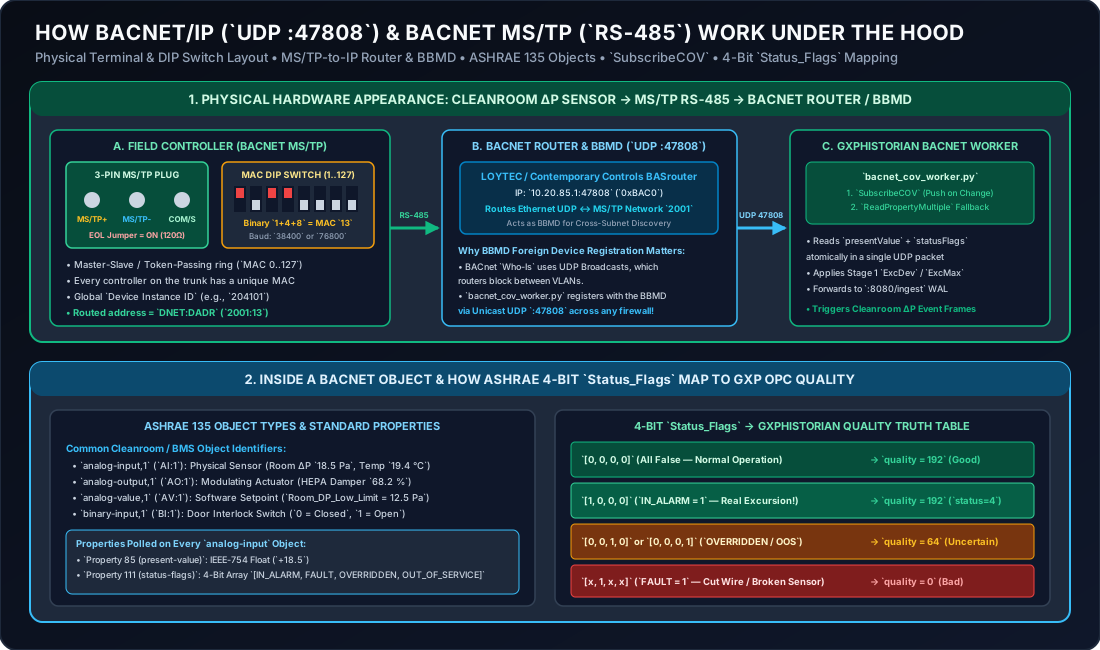
2. Physical Appearance & Wiring: BACnet/IP vs. BACnet MS/TP
In a pharmaceutical facility, you will encounter BACnet on two physical media layers:
2.1 BACnet/IP (Ethernet / UDP :47808)
- What It Looks Like: Standard RJ45 Ethernet jack on a supervisory BMS controller (e.g., Siemens PXC4/PXC5, Johnson Controls NAE/SNE, Honeywell Niagara JACE-8000, Distech Controls ECY).
- Network Port: Uses UDP Port
47808(which is0xBAC0in hexadecimal—literally spelling"BAC0"!).
2.2 BACnet MS/TP (RS-485 3-Pin Green Screw Terminal + DIP Switches)
Room-level differential pressure transmitters (e.g., Setra Model 264 / C264, Dwyer Magnehelic® MSX / Series B, Vaisala HMD/DPT, Belimo VAV actuators) are often wired along the cleanroom ceiling plenum using BACnet MS/TP (Master-Slave / Token-Passing) over shielded twisted-pair cable.
- What the Physical Connector Looks Like:
- 3-Pin Green Pluggable Phoenix Terminal Block:
MS/TP +(orNET +/B): Non-inverting RS-485 differential data line.MS/TP -(orNET -/A): Inverting RS-485 differential data line.COM(orS/Ref): Signal reference ground (never connect the shield drain wire to both ends of the ground—ground the foil shield at the router panel end only!).
- 8-Position Hardware MAC Address DIP Switch Bank:
- Next to the green terminal block is a miniature red or blue 8-switch DIP bank (
Switches 1..7set the binary MS/TP MAC Address0..127;Switch 8or a 2-pin jumper sets the End-of-Line termination). - Example: If Switches
1(),3(), and4() are pushedON, the controller’s MS/TP MAC address is .
- Next to the green terminal block is a miniature red or blue 8-switch DIP bank (
- 3-Pin Green Pluggable Phoenix Terminal Block:
- How BACnet MS/TP Connects to
GxPHistorian:- The RS-485 daisy chain terminates into a DIN-rail BACnet MS/TP-to-BACnet/IP Router (such as a LOYTEC LIP-ME201 or Contemporary Controls BASrouter).
- You never need to write serial token-passing code: the BACnet Router transparently translates
UDP :47808requests fromGxPHistorianonto the RS-485 MS/TP trunk using the routedDNET:DADRaddress (e.g., Network2001, MAC13"2001:13").
3. How the ASHRAE 135 BACnet Object Model Works
Unlike Modbus (which exposes raw unnamed numbers), every BACnet device is an Object-Oriented Database containing standardized objects and properties:
3.1 The 6 Core BACnet Object Types Used in Cleanrooms
Every object is addressed by (Object_Type, Instance_Number):
| BACnet Object Type | Standard Abbreviation | What It Represents in a GMP Cleanroom | Example Object Identifier |
|---|---|---|---|
device | DEV | The physical controller itself (must have a plant-wide unique Device Instance ID, e.g., 204101). | device,204101 |
analog-input | AI | A physical continuous sensor wired to the controller (Room in , Room Temp in , Humidity in ). | analog-input,1 |
analog-output | AO | A physical modulating actuator (0–10V / 4–20 mA HEPA supply air VAV damper or chilled-water valve position %). | analog-output,1 |
analog-value | AV | A software setpoint or calculated value (Room_DP_Low_Alarm_Limit = 12.5 Pa, Air_Changes_Per_Hour = 42.0 ACH). | analog-value,1 |
binary-input | BI | A physical 2-state dry contact (Airlock_Door_1_Closed, HEPA_Fan_Run_Status). | binary-input,1 |
multi-state-value | MSV | An enumerated room operating mode (1 = Occupied GMP Production, 2 = Unoccupied Setback, 3 = VHP Bio-Decontamination, 4 = Maintenance). | multi-state-value,1 |
3.2 Mandatory Properties Inside Every BACnet Measurement Object
When GxPHistorian’s bacnet_cov_worker.py reads analog-input,1, it inspects two critical ASHRAE properties simultaneously:
present-value(Property ID85): The current IEEE-754 floating-point reading in engineering units (e.g.,18.5Pascals).status-flags(Property ID111): A 4-bit boolean array[IN_ALARM, FAULT, OVERRIDDEN, OUT_OF_SERVICE]that reveals the true health and calibration state of the sensor.
4. How bacnet_cov_worker.py Maps ASHRAE Status_Flags to GxP OPC Quality
In a GMP audit, an inspector will ask: “How does your historian know if a facility technician placed a cleanroom differential pressure sensor into manual override (Out of Service) during filter replacement so it outputs a fake constant +15.0 Pa?”
Because edge-collector/scripts/bacnet_cov_worker.py inspects all 4 bits of status-flags on every reading via status_flags_to_quality(), GxPHistorian catches this automatically:
Bit 0: IN_ALARM | Bit 1: FAULT | Bit 2: OVERRIDDEN | Bit 3: OUT_OF_SERVICE | GxPHistorian quality | GxPHistorian status_code | Regulatory Meaning & Historian Action |
|---|---|---|---|---|---|---|
0 | 0 | 0 | 0 | 192 (Good) | 0 (Normal) | Valid calibrated measurement; included in all rollups and trends. |
1 | 0 | 0 | 0 | 192 (Good) | 4 (Active Alarm) | Real Cleanroom Excursion! The sensor is working properly and reporting a true pressure drop (e.g., +6.2 Pa). Must be archived as 192 (Good) and triggers an ISA-88 Excursion Event Frame. |
x | 0 | 1 | 0 | 64 (Uncertain) | 3 (Overridden) | Local BMS operator or hardware switch forced the value. Archived in raw table, excluded from GMP rollups (WHERE quality >= 192). |
x | 0 | x | 1 | 64 (Uncertain) | 3 (Out of Service) | Sensor decoupled for calibration (out-of-service = TRUE). Archived as Uncertain (64) so fake simulated values never enter GMP batch records! |
x | 1 | x | x | 0 (Bad) | 1 (Hardware Fault) | Open/shorted transducer (reliability != no-fault-detected). Archived as Bad (0) and excluded from all rollups. |
5. How Discovery (Who-Is), SubscribeCOV & Cross-VLAN BBMD Work
- Device Discovery (
Who-Is/I-Am):- To find what IP address or MS/TP router path owns
Device 204101, a BACnet client sends an unconfirmedWho-Is 204101broadcast. The controller (or its router) replies with anI-Am 204101containing its IP/port orDNET:DADRroute.
- To find what IP address or MS/TP router path owns
- Crossing Subnets with a BBMD (BACnet Broadcast Management Device):
- Because corporate and GMP VLAN routers block UDP broadcasts (
255.255.255.255:47808) between the Level 3 Historian VLAN (10.20.10.x) and the Level 2 BMS VLAN (10.20.85.x),bacnet_cov_worker.pyuses Foreign Device Registration (Register-Foreign-DeviceBVLC0x05) to register directly with your BMS subnet’s BBMD (10.20.85.1:47808) using standard unicast UDP!
- Because corporate and GMP VLAN routers block UDP broadcasts (
SubscribeCOV(Change of Value) vs.ReadPropertyMultiplePolling:- Event-Driven
SubscribeCOV:GxPHistoriansends aSubscribeCOVrequest with a lifetime (e.g.,300 s). Whenever the cleanroom pressure changes by more than the object’scov-increment(e.g.,0.5 Pa), the BMS controller immediately pushes aConfirmedCOVNotificationcontaining bothpresent-valueandstatus-flags. - High-Efficiency
ReadPropertyMultiple(RPM) Polling: For older MS/TP controllers that have tiny COV subscription tables (often limited to 5–8 active COV subscriptions),bacnet_cov_worker.pyreads 20+ objects in a single compressedReadPropertyMultipleUDP frame every2 sand applies Stage 1ExcDev/ExcMaxdeadband filtering in Python.
- Event-Driven
6. Production Configuration Example (edge-collector/scripts/bacnet_cov_worker.py)
from bacnet_cov_worker import AsyncBacnetTelemetryWorker, BacnetObjectSpec
worker = AsyncBacnetTelemetryWorker(    local_ip="10.20.10.50/24",    bbmd_address="10.20.85.1:47808",        # Unicast Foreign Device registration across VLANs    bbmd_ttl_seconds=300,    ingest_url="http://localhost:8080/ingest",    poll_interval_seconds=2.0,    objects=[        # Direct BACnet/IP Cleanroom AHU Controller        BacnetObjectSpec(            tag_id=301,            device_address="10.20.85.10:47808",            object_id="analog-input,1",     # Grade B Corridor Differential Pressure (Pa)            exc_dev=0.25,            exc_max=30.0,        ),        # Routed BACnet MS/TP Room Pressure Monitor (Network 2001, MAC Address 13)        BacnetObjectSpec(            tag_id=302,            device_address="2001:13",            router_address="10.20.85.1:47808",            object_id="analog-input,0",     # Grade A Isolator Suite Differential Pressure (Pa)            exc_dev=0.20,            exc_max=15.0,        ),    ],)
7. Troubleshooting Checklist for BACnet/IP & MS/TP
| Symptom | Root Cause | Exact Fix |
|---|---|---|
nc -zvu 10.20.85.10 47808 works, but Who-Is discovery returns zero devices | UDP broadcast packets are blocked between the Historian VLAN and the BMS VLAN. | Configure bbmd_address="10.20.85.1:47808" (Foreign Device Registration) OR specify the static unicast device_address="10.20.85.10:47808" directly in BacnetObjectSpec. |
| Intermittent timeouts on a BACnet MS/TP daisy chain | Duplicate MS/TP MAC switch setting on two ceiling controllers, mismatched baud rate (38400 vs 76800), or missing EOL resistor. | Check the physical DIP switches on the newly added controller to ensure its MAC (1..127) is unique on that RS-485 trunk, and flip the EOL termination switch ON only on the last controller. |
BACnet object returns unknown-object error | Vendor uses 0-based vs 1-based instance numbering (analog-input,0 vs analog-input,1) or stores the point as analog-value (AV) instead of analog-input (AI). | Query the device’s object-list property (Property 76 on device,<ID>) to list all valid (Object_Type, Instance) pairs. |